CRM & Lead Management
LiveFull CRM with lead scoring, pipeline stages, deduplication, notes, tasks, and disposition tracking -- replacing spreadsheets and generic CRM tools.
Learn more →
How it works
Every YInfra engagement makes the same move: reveal the current mess, show the owned operating layer, and make the next step obvious. It runs in three stages, backed by a consistent stack of materials.
The engagement
Three stages, in order. It starts with the Business OS Diagnostic — detailed just below — then a scoped overhaul, then your team running on owned workflows with us maintaining the layer.
We look at your public presence, intake, booking, CRM, follow-up, payments, internal workflow, SaaS stack, and AI fit. You get a concise teardown of what is leaking time, money, and control, plus a replacement map for the branded operating layer.
1–2 weeksThe diagnostic becomes a client-specific plan: branded Business OS modules, a phased rollout, ownership terms, and investment. We replace the highest-friction customer handoff first, then expand from there.
First build within 4–6 weeksWe retire or consolidate the tools we replaced, train the owner and staff, document the operating rhythm, and capture proof. AI is added only to workflows stable enough to support it, with clear staff review points.
OngoingStage one, in detail · The first step
The engagement opens with a structured teardown — not a sales call in disguise. We look at the whole operating layer end to end: where leads enter, how they become booked customers, and which rented tools the work currently leans on. Each area below gets a rating with notes; nothing is reviewed in isolation.
What you walk away with
Every diagnostic produces the same five outputs, scoped to your specific stack and customer journey — whether or not you continue with the overhaul.
Each area — public presence, intake, booking, CRM, follow-up, payments, internal workflow, SaaS stack, AI fit, and compliance posture — rated with notes.
A map of how a lead becomes a booked customer, calling out where the handoff depends on memory, manual copy-paste, or disconnected tools.
Where AI can safely assist inside the workflow — lead triage, intake summarization, follow-up drafts, internal search — and where it should be kept out.
The branded Business OS modules set against your current stack, marking each tool to keep, replace, or integrate, with the reason.
One of three paths — a Quick Win Build, a Core Business OS, or a Full Overhaul — built to remove the highest-friction handoff first, then expand from there.
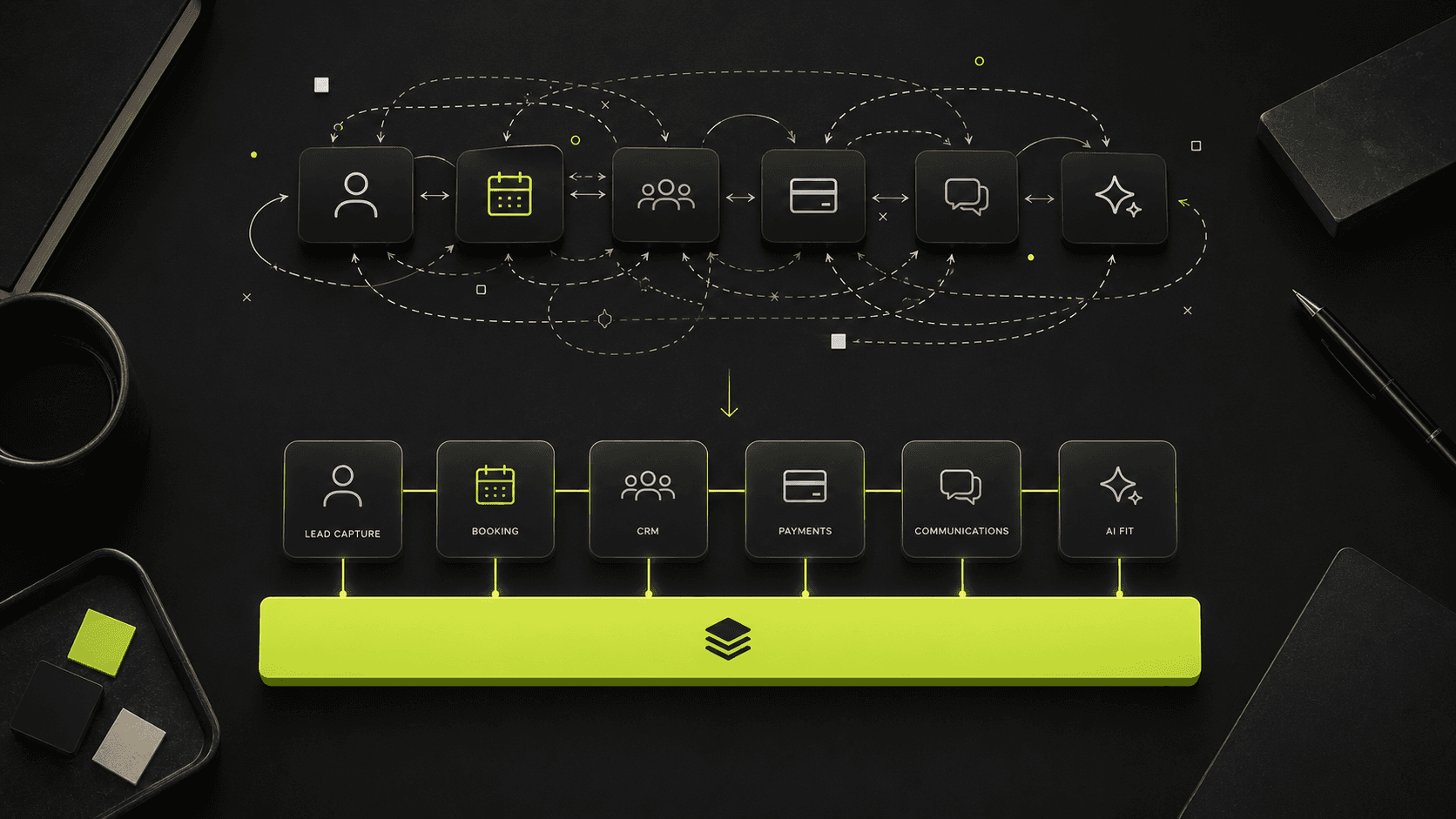
The replacement map
The diagnostic shows your current customer handoffs — where a lead becomes a booked customer, and every point that depends on memory, copy-paste, or disconnected tools.
Set against that map are the branded Business OS modules: each tool marked to keep, replace, or integrate, with the reason. AI is scoped only to the workflows stable enough to support it.
Illustrative — your actual keep/replace/integrate verdicts are produced during the diagnostic.
Honest note on the process
The Business OS Diagnostic is a structured teardown, not a sales call in disguise. The output is a document you own — a scorecard, a customer-handoff map, an AI fit review, a SaaS replacement map, and a recommended next step. If the recommended next step is nothing, we say so.
Timeline: the diagnostic itself is typically produced within a few days of the initial consultation call. The consultation call is the entry point — selective rolling intake means qualified owners get a first reply within 24-48 hours, with delivery slots scheduled or waitlisted based on capacity.
The diagnostic becomes the foundation for the overhaul proposal only if the teardown reveals work worth doing. The proposal scopes investment, ownership terms, and the rollout sequence from there. You are never quoted an investment before the diagnostic shows what actually needs replacing.
What's included
Each YInfra build is composed from a catalog of reusable modules — the same capabilities assembled to the client's specification. Live modules are in production; connect-ready modules light up when you link an account.
Full CRM with lead scoring, pipeline stages, deduplication, notes, tasks, and disposition tracking -- replacing spreadsheets and generic CRM tools.
Learn more →Stage-enforced pipeline tracker with Kanban/list views, filters, analytics feed, and relationship mapping for deals, clients, and projects.
Learn more →In-console AI assistant with tool access to live CRM data -- drafts emails, triages leads, surfaces history, and answers business questions in natural language.
Learn more →No-code automation fabric built on Activepieces (MIT) -- connects CRM, booking, email, your payment processor, and external tools with owned, self-hosted workflow automations.
Learn more →Every surface -- console URL, emails, booking pages, payment links, invoices -- carries the client's brand, not YInfra's. Custom domain, logo, colors, and typography applied system-wide.
Learn more →Custom application development inside the owned operating layer -- bespoke customer-facing and internal apps built on the same data, auth, and brand as the console, scoped to the client's spec and owned by them.
Learn more →FAQ
Next step
The Business OS Diagnostic is the entry point: a concise teardown of what is leaking time, money, and control, plus a replacement map for the owned operating layer. Book a consultation, or revisit the diagnostic detail above.
You get a concise teardown of where leads, time, and money are leaking — not a sales call disguised as a form.